Adicionando a fonte de dados
Adicionando o conector
Baseado na documentação da API do Monday.com
Este conector está em modo beta
Requisitos
- Siga as instruções abaixo com um usuário administrador (admin) ou desenvolvedor (developer)
Instruções
1) Acesse o site e faça login em monday.com utilizando um usuário com o perfil admin ou developer
Para usuários com outro perfil, os passos serão diferentes e as integrações podem não funcionar como esperado
2) Após fazer login, clique no seu avatar no canto superior direito da tela para abrir o menu suspenso e clique em "Desenvolvedores"
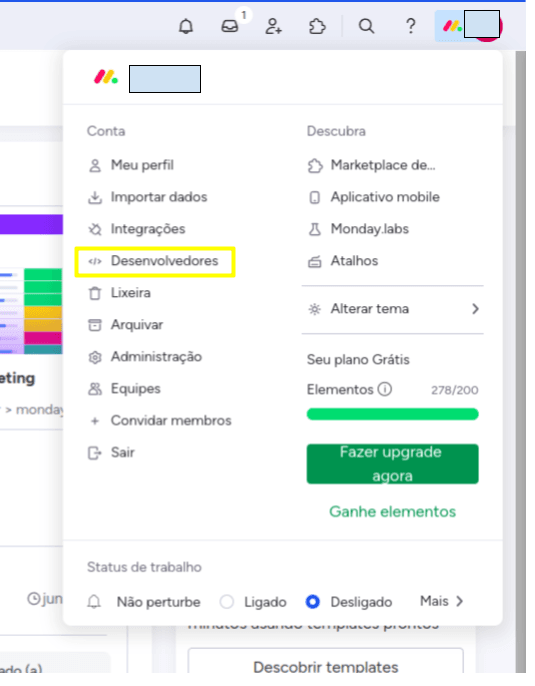
3) Na página de desenvolvedores, vá para "Meus tokens de acesso", clique em mostrar e copie o valor exibido na caixa da página

4) Faça login na plataforma da Kondado, selecione o conector do Monday.com, dê um nome para o seu conector e, em "Access Token", cole o valor obtido no passo 3
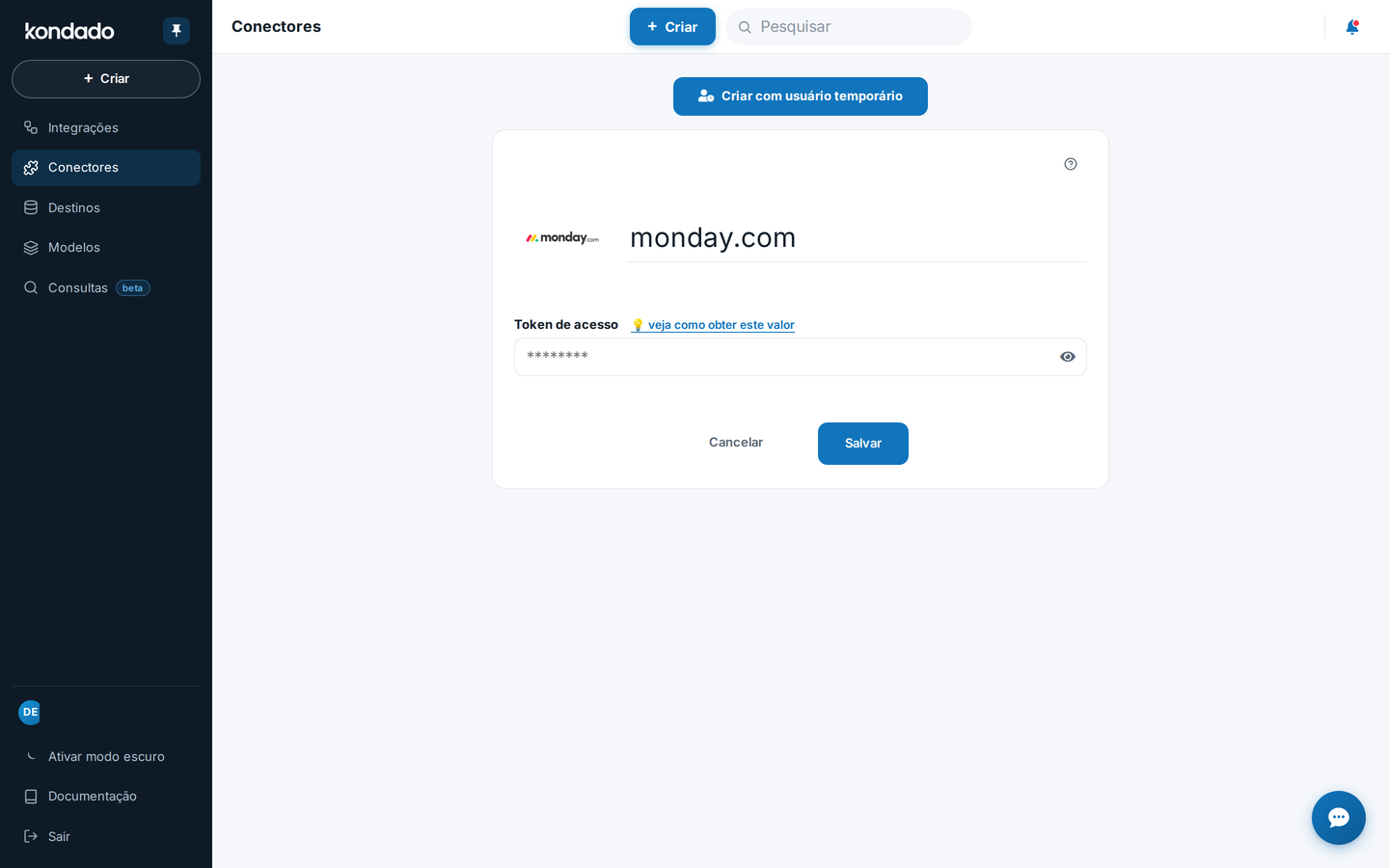
Agora basta clicar em SALVAR para começar a receber dados do Monday.com no seu Data Warehouse, Data Lake ou planilha
Pipelines
Resumo
Diagrama de relacionamento
Clique para expandir
Configurações de quadros
Esta integracao e gratuita
Tipo de replicacao: Integral
Objeto principal
Metadados dos boards do monday.com, incluindo identificação, configurações e contagens.
| Campo | Tipo | |
|---|---|---|
|
text |
[pt] Descrição em inglês: The board's unique identifier. |
|
|
text |
[pt] Descrição em inglês: The unique identifier of the folder that contains the board(s). Returns null if the board is not in a folder. |
|
|
text |
[pt] Descrição em inglês: The type of board: public, private, or share. |
|
|
text |
||
|
text |
[pt] Descrição em inglês: The board's description. |
|
|
text |
[pt] Descrição em inglês: The nickname for items on the board. Can be a predefined or custom value. |
|
|
float |
[pt] Descrição em inglês: The number of items on the board. |
|
|
text |
[pt] Descrição em inglês: The board's name. |
|
|
text |
[pt] Descrição em inglês: The board's permissions: everyone, collaborators, assignee, or owners. |
|
|
text |
[pt] Descrição em inglês: The board's state: all, active, archived, or deleted. |
|
|
text |
||
|
text |
[pt] Descrição em inglês: The board's object type: board, sub_items_board, document, or custom_object. |
|
|
timestamp |
[pt] Descrição em inglês: The last time the board was updated. |
|
|
text |
[pt] Descrição em inglês: The unique identifier of the board's workspace. Returns null for the Main workspace. |
|
|
text |
[pt] Descrição em inglês: The name from that workspace. |
monday_boards_columns
Definições das colunas de cada board do monday.com.
| Campo | Tipo | |
|---|---|---|
|
text |
[pt] Descrição em inglês: The board's unique identifier. |
|
|
text |
||
|
text |
monday_boards_users_subscribers
Assinantes (usuarios) associados a cada board.
| Campo | Tipo | |
|---|---|---|
|
text |
[pt] Descrição em inglês: The board's unique identifier. |
|
|
text |
[pt] Descrição em inglês: The user's email. |
|
|
text |
[pt] Descrição em inglês: The user's unique identifier. |
|
|
text |
[pt] Descrição em inglês: The user's name. |
|
|
text |
[pt] Descrição em inglês: The user's title. |
Itens de quadro
- Para a integração de itens de quadros, elementos que exibam o texto de opções selecionadas (por exemplo, para campos do tipo lista de opções), utilizar a integração incremental não irá atualizar o texto já escrito na tabela caso a opção tenha seu texto alterado. Para estes casos, recomendamos utilizar o modo integral
Tipo de replicacao: Incremental
Parametros:
- Data inicial de leitura (Savepoint): A partir de qual data de criação os dados serão lidos
- Board: Selecione o Board
Relacionamentos:
Itens retornados para boards monitorados via webhook.
| Campo | Tipo | |
|---|---|---|
|
text |
[pt] Descrição em inglês: id of the item |
|
|
timestamp |
||
|
text |
[pt] Nome do item. |
|
|
text |
[pt] Estado do item. |
|
|
text |
[pt] Descrição em inglês: The unique identifier of the board. |
|
|
text |
[pt] Descrição em inglês: The id of the group that item belongs. |
|
|
text |
[pt] Descrição em inglês: The title of the group that item belongs. |
|
|
text |
[pt] Descrição em inglês: The unique identifier of the board's workspace. Returns null for the Main workspace. |
|
|
text |
[pt] Descrição em inglês: If item is a subitem, the id of its parent |
|
|
text |
[pt] Descrição em inglês: an example of a custom property |
|
|
float |
[pt] Descrição em inglês: an example of a custom property |
|
|
date |
[pt] Descrição em inglês: an example of a custom property |
Itens: Conversas (atualizações)
Tipo de replicacao: Incremental com janela de atualizacao ou Integral (configuravel pelo usuario)
Parametros:
- Janela de atualização: Por quantos períodos anteriores ao savepoint os dados serão atualizados. Mais informações em: kondado.com.br/wiki
- Board: Selecione o Board
- Data inicial de leitura (Savepoint): A partir de qual data de criação os dados serão lidos
Relacionamentos:
Objeto principal
Atualizações (conversas) associadas aos itens.
| Campo | Tipo | |
|---|---|---|
|
text |
[pt] Descrição em inglês: The update's unique identifier. |
|
|
text |
[pt] Descrição em inglês: The update's item ID. |
|
|
text |
[pt] Descrição em inglês: The update's text body. |
|
|
timestamp |
[pt] Descrição em inglês: The update's creation date. |
|
|
text |
[pt] Descrição em inglês: Id of the user that created this update. |
|
|
text |
[pt] Descrição em inglês: Name of the user that created this update. |
monday_itens_conversations_replies
Respostas às atualizações de itens.
| Campo | Tipo | |
|---|---|---|
|
text |
[pt] Descrição em inglês: The parent update's unique identifier. |
|
|
text |
[pt] Descrição em inglês: The update's reply text body. |
|
|
timestamp |
[pt] Descrição em inglês: The update's reply creation date. |
|
|
text |
[pt] Descrição em inglês: The update's reply creator name. |
|
|
text |
[pt] Descrição em inglês: The update's reply creator id. |
|
|
text |
[pt] Descrição em inglês: The update's reply ID. |
Logs de atividades
Tipo de replicacao: Incremental
Parametros:
- Data inicial de leitura (Savepoint): A partir de qual data de criação os dados serão lidos
- Board: Selecione o Board
Relacionamentos:
Eventos do log de atividades do monday.com (ações em boards e itens).
| Campo | Tipo | |
|---|---|---|
|
text |
[pt] Descrição em inglês: The unique identifier of the activity log event. |
|
|
text |
[pt] Descrição em inglês: The unique identifier of the account that initiated the event. |
|
|
timestamp |
[pt] Descrição em inglês: The time of the event. |
|
|
text |
[pt] Descrição em inglês: The entity of the event that was changed: pulse or board. |
|
|
text |
[pt] Descrição em inglês: The action that took place. |
|
|
text |
[pt] Descrição em inglês: The unique identifier of the user who initiated the event. |
|
|
text |
[pt] Descrição em inglês: The id of a pulse transference from boards availabe when the event is one of: move_pulse_from_board, move_pulse_into_board, move_pulse_from_group, move_pulse_into_group |
|
|
text |
[pt] Descrição em inglês: The board id, used in all types of logs |
|
|
text |
[pt] Descrição em inglês: The colum id (string), availabe when the event is one of: create_column change_column_settings, update_column_name, delete_column, restore_column |
|
|
text |
[pt] Descrição em inglês: The column title, availabe when the event is one of: create_column, change_column_settings, update_column_name, delete_column, restore_column |
|
|
text |
[pt] Descrição em inglês: The column type, availabe when the event is one of: create_column, change_column_settings, update_column_name, delete_column, restore_column |
|
|
text |
[pt] Descrição em inglês: Id of the board that will receive the moved item, availabe when the event is one of: move_pulse_from_board, move_pulse_into_board |
|
|
text |
[pt] Descrição em inglês: The type of board to which the pulse was moved, used in move_pulse_from_board, move_pulse_into_board |
|
|
text |
[pt] Descrição em inglês: The name of board to which the pulse was moved, used in move_pulse_from_board, move_pulse_into_board |
|
|
text |
[pt] Descrição em inglês: The color of the group to which the pulse was moved, used in move_pulse_from_group, move_pulse_into_group |
|
|
text |
[pt] Descrição em inglês: The id of the group to which the pulse was moved, used in move_pulse_from_group, move_pulse_into_group |
|
|
boolean |
[pt] Descrição em inglês: The hierarchy of the group to which the pulse was moved, used in move_pulse_from_group, move_pulse_into_group |
|
|
text |
[pt] Descrição em inglês: The title of the group to which the pulse was moved, used in move_pulse_from_group, move_pulse_into_group |
|
|
text |
[pt] Descrição em inglês: The group color, availabe when the event is one of: move_pulse_from_group, move_pulse_into_group, create_group, update_group_name, update_group_color, delete_group, archive_group, restore_group and create_pulse |
|
|
text |
[pt] Descrição em inglês: The group id, availabe when the event is one of: move_pulse_from_group, move_pulse_into_group, create_group, update_group_name, update_group_color, delete_group, archive_group and restore_group |
|
|
text |
[pt] Descrição em inglês: The group name, availabe when the event is one of: move_pulse_from_group, move_pulse_into_group, create_group, update_group_name, update_group_color, delete_group, archive_group and restore_group |
|
|
text |
[pt] Descrição em inglês: The group title, availabe when the event is one of: move_pulse_from_group, move_pulse_into_group, create_group, update_group_name, update_group_color, delete_group, archive_group and restore_group |
|
|
boolean |
[pt] Descrição em inglês: When this is a batch action, availabe when the event is one of: move_pulse_from_board, move_pulse_into_board, move_pulse_from_group, move_pulse_into_group |
|
|
boolean |
[pt] Descrição em inglês: Whenever a colum has hide permissions |
|
|
boolean |
[pt] Descrição em inglês: Whenever has more than one group, one stay on top, used in create_group, update_group_name, update_group_color, delete_group, archive_group, restore_group |
|
|
boolean |
[pt] Descrição em inglês: When this is an undo action, availabe when the event is one of: restore_pulse, board_view_restored, restore_group, restore_column |
|
|
text |
[pt] Descrição em inglês: The item id, availabe when the event is one of: subscribe or add_owner |
|
|
text |
[pt] Descrição em inglês: The item name, availabe when the event is one of: subscribe or add_owner |
|
|
text |
[pt] Descrição em inglês: The item type, availabe when the event is one of: subscribe or add_owner |
|
|
text |
[pt] Descrição em inglês: The old value of color, availabe when the event is : update_group_color |
|
|
boolean |
[pt] Descrição em inglês: When a board nickname was modified, this represents if is a hidden val |
|
|
text |
[pt] Descrição em inglês: The old value of labes availabe when the event is: update_column_name |
|
|
text |
[pt] Descrição em inglês: The old name value availabe when the event is one of: update_board_nickname, update_name, update_group_name, update_column_name |
|
|
text |
[pt] Descrição em inglês: When a permission was updated, this is the new value, availabe when the event is one of:update_board_permissions, update_board_view_permissions |
|
|
text |
[pt] Descrição em inglês: The old name in plural availabe when the event is one of: update_board_nickname, update_name, update_group_name, update_column_name |
|
|
text |
[pt] Descrição em inglês: The old preset type availabe when the event is one of: update_board_nickname, update_name, update_group_name, update_column_name |
|
|
text |
[pt] Descrição em inglês: The old name in singular availabe when the event is one of: update_board_nickname, update_name, update_group_name, update_column_name |
|
|
float |
[pt] Descrição em inglês: The old value state value of a pulse availabe when the event is one of: delete_pulse, archive_pulse, restore_pulse |
|
|
text |
[pt] Descrição em inglês: The id of the pulse, availabe when the event is one of: subscribe, add_owner, create_pulse, delete_pulse, archive_pulse, restore_pulse, move_pulse_from_board, move_pulse_into_board, move_pulse_from_group or move_pulse_into_group |
|
|
text |
[pt] Descrição em inglês: The name of the pulse, availabe when the event is one of: subscribe, add_owner, create_pulse, delete_pulse, archive_pulse, restore_pulse, move_pulse_from_board, move_pulse_into_board, move_pulse_from_group or move_pulse_into_group |
|
|
text |
[pt] Identificador do board envolvido em eventos move_pulse_from_board/move_pulse_into_board/move_pulse_from_group/move_pulse_into_group. |
|
|
text |
[pt] Descrição em inglês: The kind of the source board, availabe when the event is one of: move_pulse_from_board, move_pulse_into_board, move_pulse_from_group, move_pulse_into_group |
|
|
text |
[pt] Descrição em inglês: The name of the source board, availabe when the event is one of: move_pulse_from_board, move_pulse_into_board, move_pulse_from_group, move_pulse_into_group |
|
|
text |
[pt] Descrição em inglês: The color of the source board, availabe when the event is one of: move_pulse_from_board, move_pulse_into_board, move_pulse_from_group, move_pulse_into_group |
|
|
text |
[pt] Descrição em inglês: The id of the source board, availabe when the event is one of: move_pulse_from_board, move_pulse_into_board, move_pulse_from_group, move_pulse_into_group |
|
|
boolean |
[pt] Descrição em inglês: When a pulse is moved from a board, if it comes from a top group availabe when the event is one of: move_pulse_from_board, move_pulse_into_board, move_pulse_from_group, move_pulse_into_group |
|
|
text |
[pt] Descrição em inglês: The source board title availabe when the event is one of: move_pulse_from_board, move_pulse_into_board, move_pulse_from_group, move_pulse_into_group |
|
|
text |
[pt] Descrição em inglês: The user id availabe when the event is one of: subscribe, unsubscribe |
|
|
text |
[pt] Descrição em inglês: Text value availabe when the event is: update_column_value |
|
|
text |
[pt] Descrição em inglês: The id of the view availabe when the event is: board_view_added, board_view_deleted, board_view_changed, board_view_enabled, board_view_disabled, board_view_regenerate_token, board_view_restored, board_view_duplicated |
|
|
text |
[pt] Descrição em inglês: New color availabe when the event is: update_group_color |
|
|
text |
[pt] Descrição em inglês: The new value of labes availabe when the event is: update_column_name |
|
|
text |
[pt] Descrição em inglês: The new value of name availabe when the event is one of: create_pulse, delete_pulse, archive_pulse, restore_pulse, move_pulse_from_board, move_pulse_into_board, move_pulse_from_group, move_pulse_into_group |
|
|
text |
[pt] Descrição em inglês: The neu permission availabe when the event is one of: update_board_permissions, update_board_view_permissions |
|
|
text |
[pt] Descrição em inglês: The plural name of field availabe when the event is one of: update_board_nickname, update_group_name, update_column_name, update_name |
|
|
text |
[pt] Descrição em inglês: The preset name of field availabe when the event is one of: update_board_nickname, update_group_name, update_column_name, update_name |
|
|
text |
[pt] Descrição em inglês: The singular name of field availabe when the event is one of: update_board_nickname, update_group_name, update_column_name, update_name |
|
|
float |
[pt] Descrição em inglês: New pulse state availabe when the event is one of: delete_pulse, archive_pulse, restore_pulse. |
|
|
text |
[pt] Descrição em inglês: The new value availabe when the event is one of: update_column_value, update_name, update_board_nickname, create_update, update_group_name, update_group_color, update_column_name, update_board_permissions, update_board_view_permissions |
|
|
text |
[pt] Descrição em inglês: The new view type availabe when the event is one of: update_board_view_permissions, board_view_added, board_view_deleted, board_view_changed, board_view_enabled, board_view_disabled, board_view_regenerate_token, board_view_restored, board_view_duplicated |
|
|
text |
[pt] Descrição em inglês: The item's column values. |
Usuarios
Tipo de replicacao: Integral
Relacionamentos:
Objeto principal
Perfil de usuários da conta monday.com.
| Campo | Tipo | |
|---|---|---|
|
text |
[pt] Descrição em inglês: The user's unique identifier. Configurações de quadros > users_subscribers > users_subscribers_id |
|
|
text |
||
|
text |
||
|
text |
[pt] Descrição em inglês: The user's date of birth. |
|
|
text |
[pt] Descrição em inglês: The user's country code. |
|
|
timestamp |
[pt] Descrição em inglês: The user's creation date |
|
|
text |
[pt] Descrição em inglês: The user's language. |
|
|
text |
[pt] Descrição em inglês: The user's email. |
|
|
boolean |
[pt] Descrição em inglês: Returns true if the user is enabled. |
|
|
boolean |
[pt] Descrição em inglês: Returns true if the user is an admin. |
|
|
boolean |
[pt] Descrição em inglês: Returns true if the user is a guest. |
|
|
boolean |
[pt] Descrição em inglês: Returns true if the user didn't confirm their email yet. |
|
|
boolean |
[pt] Descrição em inglês: Returns true if the user verified their email. |
|
|
boolean |
[pt] Descrição em inglês: Returns true if the user is only a viewer. |
|
|
timestamp |
[pt] Descrição em inglês: The date the user joined the account |
|
|
timestamp |
[pt] Descrição em inglês: The last date and time the user was active |
|
|
text |
[pt] Descrição em inglês: The user's location. |
|
|
text |
[pt] Descrição em inglês: The user's mobile phone number. |
|
|
text |
[pt] Descrição em inglês: The user's name. |
|
|
text |
[pt] Descrição em inglês: The user's out-of-office status. |
|
|
text |
[pt] Descrição em inglês: The user's phone number. |
|
|
text |
[pt] Descrição em inglês: Returns the URL of the user's uploaded photo in its original size. |
|
|
text |
[pt] Descrição em inglês: Returns the URL of the user's uploaded photo in a small size (150x150 px). |
|
|
text |
[pt] Descrição em inglês: Returns the URL of the user's uploaded photo in thumbnail size (100x100 px). |
|
|
text |
[pt] Descrição em inglês: Returns the URL of the user's uploaded photo in a small thumbnail size (50x50 px). |
|
|
text |
[pt] Descrição em inglês: Returns the URL of the user's uploaded photo in tiny size (30x30 px). |
|
|
text |
[pt] Descrição em inglês: The product the user first signed up to. |
|
|
text |
[pt] Descrição em inglês: The user's timezone identifier. |
|
|
text |
[pt] Descrição em inglês: The user's title. |
|
|
text |
[pt] Descrição em inglês: The user's profile URL. |
|
|
float |
[pt] Descrição em inglês: The user’s UTC hours difference. |
monday_users_teams
Times associados a cada usuário.
Notas
- Para as integrações onde é possível deletar registros, você pode escolher utilizar a integração no modo integral no último passo do processo de criação caso queira que estas alterações sejam refletidas em sua integração. Caso contrário, registros removidos continuarão em suas tabelas
- A alteração de alguns campos pode não refletir na data de atualização do registro - por exemplo, para campos alterados de maneira automática ou via integração. Para estes casos, recomendamos utilizar o modo integral
- Parte desta documentacao foi gerada automaticamente por IA e pode conter erros. Recomendamos verificar informacoes críticas
Integrar Monday.com à Kondado
Configure o conector do Monday.com na Kondado para enviar dados de quadros, itens, conversas, logs e usuários ao seu Data Warehouse ou Data Lake.
Obter token de acesso no Monday.com
Acesse monday.com com um perfil admin ou developer, clique no avatar no canto superior direito, vá em "Desenvolvedores" e, em "Meus tokens de acesso", copie o valor exibido. Outros perfis podem gerar passos diferentes e integrações inesperadas.
Cadastrar o conector na Kondado
Faça login na plataforma da Kondado, selecione o conector do Monday.com, dê um nome e cole o Access Token no campo correspondente. Clique em SALVAR para ativar.
Escolher integrações e modo de sincronização
Selecione entre as integrações disponíveis: Configurações de quadros, Itens de quadro, Conversas, Logs de atividades ou Usuários. Para integrações com deleção de registros ou campos de opções com texto alterável, prefira o modo integral no último passo.
Verificar relacionamentos entre tabelas
Consulte o gráfico de relacionamento do conector para entender como campos como board_id, item_id e user_id conectam as diferentes tabelas entre si.
Consumir dados no destino escolhido
Após salvar, os dados fluem automaticamente para seu Data Warehouse, Data Lake ou planilha. Utilize o modo integral quando alterações automáticas não refletirem na data de atualização do registro.
