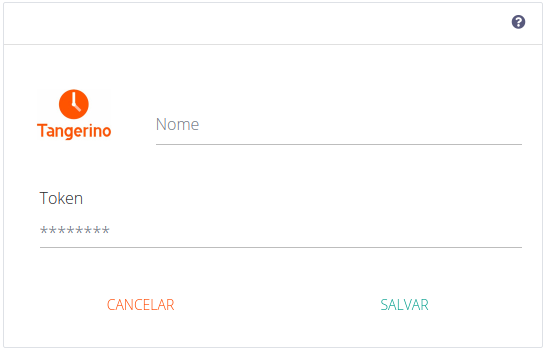
Adicionando o conector
Adicionando o conector do Tangerino na Kondado, você pode ter acesso aos dados de ponto dos seus colaboradores no seu Data Warehouse ou Data Lake – processo também conhecido como ETL ou ELT
Para adicionar o conector do Tangerino, siga os passos abaixo:
1) Entre em contato com os canais de suporte da ferramenta em tangerino.com.br e peça para que seja liberado o seu token de integração
2) Com o retorno do suporte, acesse a plataforma do Tangerino e vá em Configurações > Integração e copie o valor do token
3) Faça login na Kondado, vá para a seção de adicionar conectores e selecione o conector do Tangerino
4) Na página de preenchimento dos dados do conector, cole em “Token” o valor copiado do passo (2)
5) Agora basta dar um nome para o seu conector e clicar em SALVAR
Integrações
Gráfico de relacionamento entre tabelas
Resumo diário
| Campo |
Tipo |
|
|
id
|
text |
|
|
date
|
timestamp |
|
|
fictahours
|
float |
|
|
overtimetypefour
|
float |
|
|
employerid
|
float |
|
|
oncallhours
|
float |
|
|
employeeid
|
float |
|
|
overtimetypetwo
|
float |
|
|
overtimetypethree
|
float |
|
|
workscheduleid
|
float |
|
|
estimatedhours
|
float |
|
|
overlimitcompensatoryhoursbalance
|
float |
|
|
workedhours
|
float |
|
|
isadjustment
|
boolean |
|
|
isholiday
|
boolean |
|
|
paidhours
|
float |
|
|
nighthours
|
float |
|
|
missed
|
boolean |
|
|
daymissing
|
float |
|
|
hoursbalance
|
float |
|
|
overtimetypeone
|
float |
|
|
punchroleid
|
float |
|
|
calculatedhoursbalance
|
float |
|
|
compensatoryhoursbalance
|
float |
|
|
remaininghours
|
float |
|
|
movementtype
|
text |
|
Funcionários
Objeto principal
| Campo |
Tipo |
|
|
id
|
text |
|
|
jobroledto__id
|
float |
|
|
name
|
text |
|
|
pin
|
text |
|
|
company__id
|
float |
|
|
birthdate
|
timestamp |
|
|
email
|
text |
|
|
fired
|
boolean |
|
|
externalid
|
text |
|
|
cpf
|
text |
|
|
admissiondate
|
timestamp |
|
|
currentworkschedule__startdate
|
timestamp |
|
|
currentworkschedule__id
|
float |
|
|
lastmanager__id
|
float |
|
|
effectivedate
|
timestamp |
|
managers
| Campo |
Tipo |
|
|
employee_id
|
text |
|
|
managers__id
|
float |
|
workplaceList
| Campo |
Tipo |
|
|
employee_id
|
text |
|
|
workplacelist__id
|
float |
|
Registros de ponto
| Campo |
Tipo |
|
|
id
|
float |
|
|
hashend
|
text |
|
|
edited
|
boolean |
|
|
workplace__defaultplace
|
boolean |
|
|
workplace__reserved
|
boolean |
|
|
workplace__name
|
text |
|
|
workplace__employer
|
text |
|
|
workplace__phonenumber
|
text |
|
|
workplace__employees
|
text |
|
|
workplace__registerdate
|
timestamp |
|
|
workplace__id
|
float |
|
|
workplace__externalcode
|
text |
|
|
workplace__maximumallocation
|
text |
|
|
adjust
|
boolean |
|
|
editedout
|
boolean |
|
|
dateinfull
|
timestamp |
|
|
lastmodifieddate
|
timestamp |
|
|
plataform
|
text |
|
|
editable
|
boolean |
|
|
adjustmentreason
|
text |
|
|
photoout
|
text |
|
|
typetimeappointment
|
float |
|
|
fulldayadjustment
|
text |
|
|
photoin
|
text |
|
|
date
|
timestamp |
|
|
nsrout
|
float |
|
|
pendingtype
|
text |
|
|
employer__companylastname
|
text |
|
|
employer__employeepassword
|
text |
|
|
employer__timezone
|
text |
|
|
employer__id
|
float |
|
|
employer__employercode
|
text |
|
|
employer__name
|
text |
|
|
employer__adminfrw
|
boolean |
|
|
employer__accountstatus
|
text |
|
|
employer__schedulecontroltype
|
text |
|
|
employer__bannerid
|
text |
|
|
employer__login
|
text |
|
|
employer__document
|
text |
|
|
employer__email
|
text |
|
|
locationin__city
|
text |
|
|
locationin__state
|
text |
|
|
locationin__neighborhood
|
text |
|
|
locationin__excluded
|
boolean |
|
|
locationin__address
|
text |
|
|
locationin__latitude
|
float |
|
|
locationin__complement
|
text |
|
|
locationin__id
|
float |
|
|
locationin__longitude
|
float |
|
|
dateout
|
timestamp |
|
|
status
|
text |
|
|
lastmodifieduser
|
text |
|
|
recognizedfacein
|
boolean |
|
|
justification
|
text |
|
|
locationout__city
|
text |
|
|
locationout__state
|
text |
|
|
locationout__neighborhood
|
text |
|
|
locationout__excluded
|
boolean |
|
|
locationout__address
|
text |
|
|
locationout__latitude
|
float |
|
|
locationout__complement
|
text |
|
|
locationout__id
|
float |
|
|
locationout__longitude
|
float |
|
|
recognizedfaceout
|
boolean |
|
|
nsrin
|
float |
|
|
comments
|
text |
|
|
hashstart
|
text |
|
|
editedin
|
boolean |
|
|
version
|
text |
|
|
dateoutfull
|
timestamp |
|
|
validfingerprint
|
boolean |
|
|
excluded
|
boolean |
|
|
employee__requireinteresseplace
|
boolean |
|
|
employee__fired
|
boolean |
|
|
employee__pin
|
text |
|
|
employee__webauthorization
|
text |
|
|
employee__timezone
|
text |
|
|
employee__pis
|
text |
|
|
employee__id
|
float |
|
|
employee__appauthorization
|
text |
|
|
employee__effectivedate
|
timestamp |
|
|
employee__tokenid
|
text |
|
|
employee__receivepunchmail
|
boolean |
|
|
employee__facialrecognitiononline
|
boolean |
|
|
employee__scheduledfire
|
text |
|
|
employee__platform
|
text |
|
|
employee__externalid
|
text |
|
|
employee__fireddate
|
text |
|
|
employee__excluded
|
boolean |
|
|
employee__requirephotoweb
|
boolean |
|
|
employee__facialrecognition
|
boolean |
|
|
employee__email
|
text |
|
|
employee__photourl
|
text |
|
|
employee__company
|
text |
|
|
employee__facialrecognitionfailaspending
|
boolean |
|
|
employee__enablefacialrecognition
|
boolean |
|
|
employee__nighthoursvalidatelastday
|
boolean |
|
|
employee__maxpunchduration
|
float |
|
|
employee__name
|
text |
|
|
employee__recordspunch
|
boolean |
|
|
employee__country
|
text |
|
|
employee__firebasetoken
|
text |
|
|
employee__requirefingerprint
|
boolean |
|
|
devicedid
|
text |
|
|
model
|
text |
|
|
allowance
|
boolean |
|
|
type
|
float |
|
|
datein
|
timestamp |
|